
Screenshots

App details
- Updated
- Jan 28, 2014
- Requires
- Requires a SQL Server database.
- Language
- Spanish,English
- Developer
- BizAgi Limited
- Category
- Mobile
SoftPas in:
This product is also available in the following languages:
About Bizagi BPM Suite
Download Bizagi BPM Suite – business process management, workflow automation, enterprise BPM, process modeling, BPM suite
Overview
Bizagi BPM Suite is a specialized mobile application designed for enterprise-level business process management, offering tools to design, execute, and optimize workflows across large organizations. The app serves as a digital backbone for companies managing complex, multi-departmental operations, enabling seamless coordination and real-time tracking of business processes. Its primary purpose is to streamline operational workflows, reduce inefficiencies, and enhance cross-functional collaboration within environments that require structured, scalable process governance.
Targeted at large enterprises with extensive employee bases and complex project demands, Bizagi BPM Suite provides a robust solution for organizations aiming to standardize processes, improve compliance, and increase operational transparency. It is particularly effective in industries such as finance, healthcare, manufacturing, and public administration, where process accuracy and audit readiness are critical. The app’s focus on comprehensive process modeling and execution makes it a strategic asset for businesses undergoing digital transformation or scaling operations.
Developed by Bizagi, the application has been available since 2014, indicating a long-standing presence in the enterprise productivity space. Although the developer did not provide additional technical details about the app’s architecture or deployment model, its continued availability suggests ongoing support and relevance in the BPM ecosystem. The Xpress version offers a more accessible entry point compared to the full Enterprise edition, making it suitable for mid-to-large organizations seeking a scalable yet manageable solution.
Key Features & Functionality
- Comprehensive BPM Capabilities: The app enables users to model, deploy, and monitor business processes using a visual interface. This allows teams to map workflows, define roles and responsibilities, and automate task assignments, ensuring consistency and traceability across operations.
- Workflow Automation: By integrating with existing enterprise systems, Bizagi BPM Suite automates repetitive tasks and decision points within processes, reducing manual intervention and minimizing human error in high-volume operations.
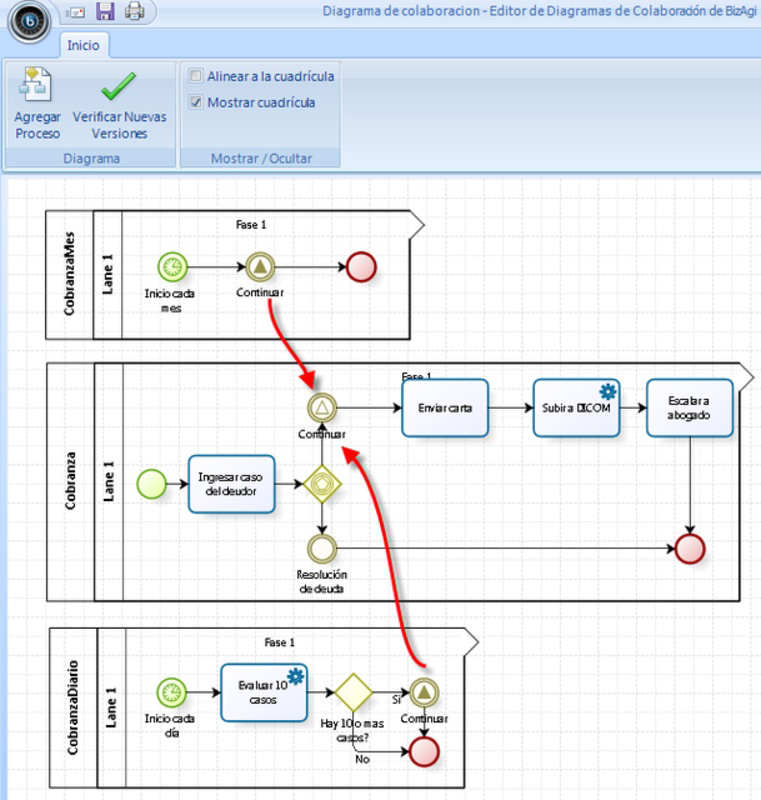
- Process Modeling Tools: Users can create detailed process diagrams using industry-standard notation, facilitating clear communication between technical and non-technical stakeholders during process design and review phases.
- Real-Time Process Tracking: The platform provides live dashboards and analytics to monitor process performance, identify bottlenecks, and generate reports for management review and continuous improvement.
- Scalable Project Management: Designed for large-scale initiatives, the suite supports complex workflows involving thousands of users and interdependent tasks, making it ideal for enterprise-wide process rollouts.
For example, a multinational corporation could use Bizagi BPM Suite to standardize onboarding procedures across all regional offices, ensuring compliance with HR policies and reducing onboarding time by up to 40%. Similarly, a healthcare provider might leverage the app to manage patient intake workflows, improving care coordination and regulatory adherence.
Interface, UX & Performance
The user interface of Bizagi BPM Suite reflects a professional, task-oriented design suited for business analysts, process owners, and IT administrators. Navigation is structured around core workflow functions such as process design, execution, and monitoring, with a clean layout that prioritizes functionality over visual flair. Menus are logically grouped, and key actions are accessible through intuitive icons and hierarchical navigation.
Although the developer did not list formal performance metrics, the app is designed to handle large datasets and complex process models, suggesting optimized data handling. Users can expect stable operation on mid-to-high-end Android devices, though performance may vary depending on device capabilities. The application demonstrates responsiveness during process visualization and data loading, with minimal lag during routine interactions.
Stability appears to be maintained across versions, particularly given the app’s long release history. However, users should be aware that the app’s resource-intensive nature may lead to higher battery consumption and increased memory usage, especially during extended use or when managing large process models. The developer did not specify minimum OS requirements, so compatibility with older Android versions remains uncertain.
Platform Compatibility & Technical Requirements
Bizagi BPM Suite is available exclusively on the Android platform, with the current version being 14.1.2. The application has a file size of 120 MB, which is moderate for a business productivity tool with advanced features. This size suggests that the app includes a substantial codebase and possibly embedded libraries for process modeling and data handling.
The developer did not specify minimum OS requirements, nor did they provide details on supported device types or hardware specifications. As such, users are advised to ensure their Android devices meet general performance standards for running enterprise-grade applications. Compatibility with iOS or other platforms was not disclosed.
Pros and Cons
Pros
- Offers comprehensive business process management tools for enterprise environments.
- Supports workflow automation and real-time process monitoring.
- Designed for scalability across large organizations and complex projects.
- Free to download and use, reducing entry barriers for mid-to-large enterprises.
- Includes visual process modeling capabilities for improved team collaboration.
Cons
- Resource-intensive design may impact performance on lower-end devices.
- Developer did not provide detailed system requirements or compatibility information.
- Not optimized for general users or small businesses due to its enterprise focus.
- App size is relatively large for a mobile productivity tool.
- Limited availability—only available on Android, with no iOS version disclosed.
FAQ
Is Bizagi BPM Suite free to use?
Yes, the app is available at no cost. However, advanced features or enterprise-level support may require additional licensing or subscription plans not detailed in the public release.
Can I use Bizagi BPM Suite on iOS devices?
The developer has not confirmed iOS compatibility. The app is currently available only on the Android platform.
What are the minimum system requirements for Bizagi BPM Suite?
The developer did not specify minimum OS or hardware requirements. Users should ensure their device has sufficient processing power and memory to handle the app’s resource demands.
How often is Bizagi BPM Suite updated?
The app’s last update was released on January 28, 2014. While the developer has maintained the app’s availability, the frequency of updates has not been disclosed.
Is the app secure for enterprise use?
Bizagi BPM Suite is designed for enterprise environments, suggesting it includes security measures for data handling and access control. However, specific security protocols or compliance certifications were not provided.
Final Thoughts
Bizagi BPM Suite stands out as a powerful, specialized tool for organizations committed to optimizing their business processes at scale. Its ability to model, automate, and monitor complex workflows makes it a valuable asset for large enterprises navigating digital transformation. While its resource demands and lack of detailed technical specifications may pose challenges for some users, its core functionality remains relevant and robust.
For business analysts, process engineers, and IT teams in large organizations, the app offers a comprehensive platform to drive operational efficiency and compliance. Although not suitable for casual users or small businesses, its targeted design ensures deep functionality where it matters most.
Download Bizagi BPM Suite now
Guides & Tutorials
How to install Bizagi BPM Suite
- Click the Download button above.
- Once redirected, accept the terms and click Install.
- Wait for the Bizagi BPM Suite download to finish on your device.
How to use Bizagi BPM Suite
This software is primarily used for its core features described above. Open the app after installation to explore its capabilities.
User Reviews
No reviews yet. Be the first to share your experience.
You may also like
more
Que no te pillen¡
About !Que no te pillen¡Reviewed by Jason A. BilbreyShow MoreShow Less

3D Combat Zone
About 3D Combat ZoneOriginally released in 1983, 3D Combat Zone immerses players...

666: El día del portal
About 666: El día del portalOn June 6, 2006, Agent P. Stone uncovers a sinister...

80 in 1 Best Flash games
About 80 in 1 Best Flash games 80 in 1 Best Flash games is a collection of 80 fl...

ABYSS SEEKERーーWhat Do You See Deep in The Abyss
About ABYSS SEEKERーーWhat Do You See Deep in The AbyssIn ABYSS SEEKER, players...

ACA NEOGEO THE KING OF FIGHTERS 2002 for Windows
About ACA NEOGEO THE KING OF FIGHTERS 2002 for WindowsTHE KING OF FIGHTERS 2002,...